
We Open-Sourced Our AI Agent Traffic Analyzer


Most AI bots don't run JavaScript. They're invisible in Google Analytics, Amplitude, and every other client-side analytics tool you're probably using. The only way to see them is through server logs.
This is a problem if you're trying to understand how AI agents interact with your content, which pages they reference, which topics they care about, and whether any of that activity translates into actual human visitors from ChatGPT, Perplexity, or Claude.
We've been building tooling to solve this at Siteline, and were a bit hesitant to give away the core of what we've been working on. But in the end it was just too cool not to share and we want to encourage everyone to tap into the awesome signal in AI bot + agent visits data for the GEO efforts - rather than just relying on prompt tracking.
So we open-sourced a Claude SKILL.md that automates the entire analysis - from pulling server log data to generating an actionable report with content and technical recommendations.
Add it to Claude, Claude Code or Cursor and run it on your own site.
What it does
The skill handles three things that are typically painful to do manually:
1. Pulls AI agent visit data from your server logs
Connect Cloudflare (works on the free plan), Vercel, CloudFront, or upload CSV/JSON exports from any CDN. The skill classifies 30+ AI bots into four categories:
- AI user-initiated (ChatGPT-User, Claude-User, Perplexity-User) — direct proxies for what real users are prompting
- AI search crawlers (OAI-SearchBot, PerplexityBot) — building AI search indexes
- LLM training crawlers (GPTBot, ClaudeBot) — collecting model training data
- Traditional search (Googlebot, bingbot) — for comparison
If you've read our post on analyzing ChatGPT-User bot traffic, this automates and extends that entire methodology.
2. Adds in human referral data from your analytics tool
Optionally connect Mixpanel, Amplitude, Google Analytics, or any tool that tracks referrer data. This lets you see not just which bots visit your pages, but whether those visits translate into real human traffic from AI platforms.
3. Clusters pages into topics and connects everything
The skill normalizes URLs, clusters your pages into topical groups, and maps bot activity to real referral traffic from ChatGPT, Perplexity, Claude, and others. The output is an in-depth analysis report with charts, actionable insights for content strategy and technical optimizations, plus the raw data to port into your own tools.
What you get with the report
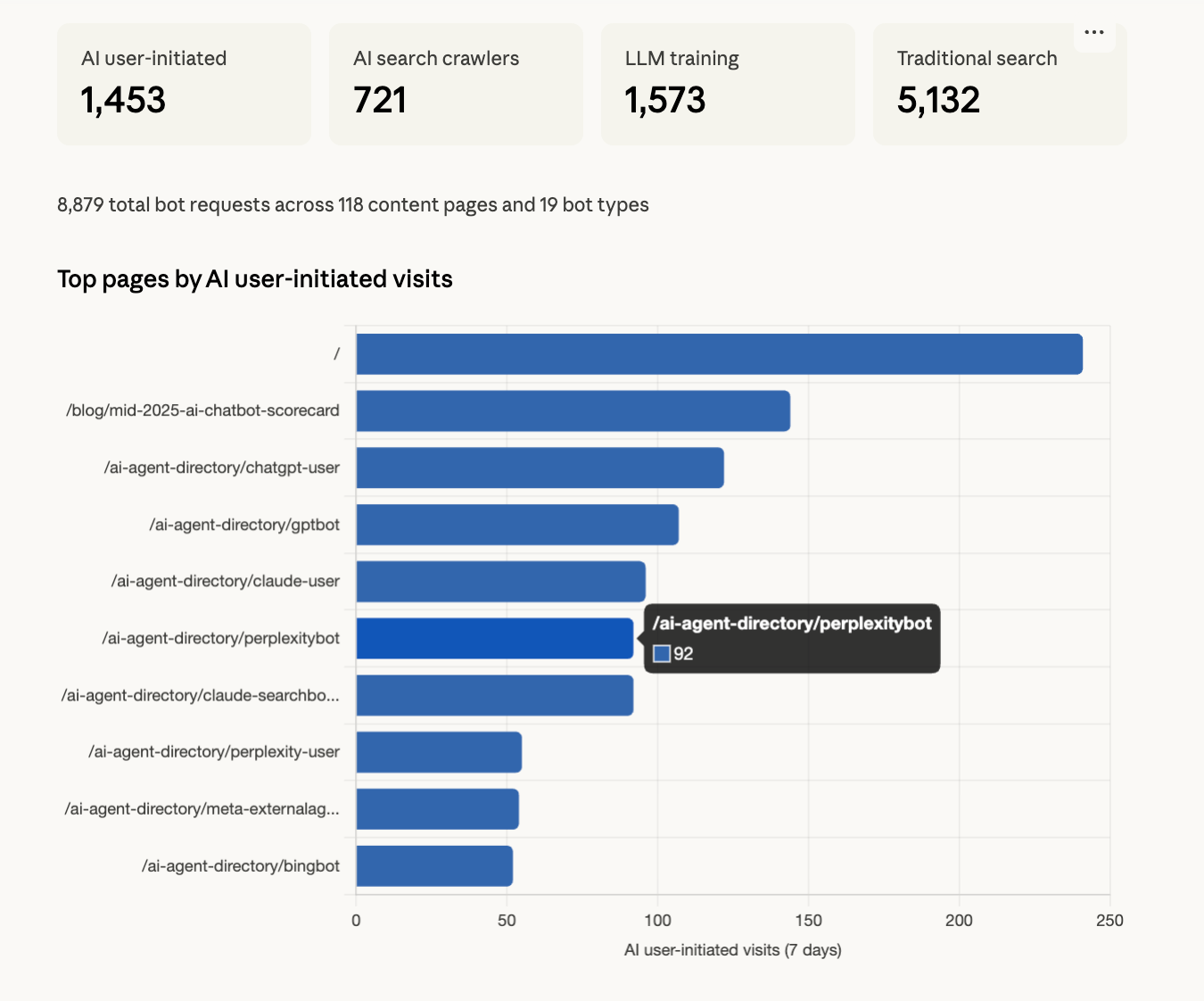
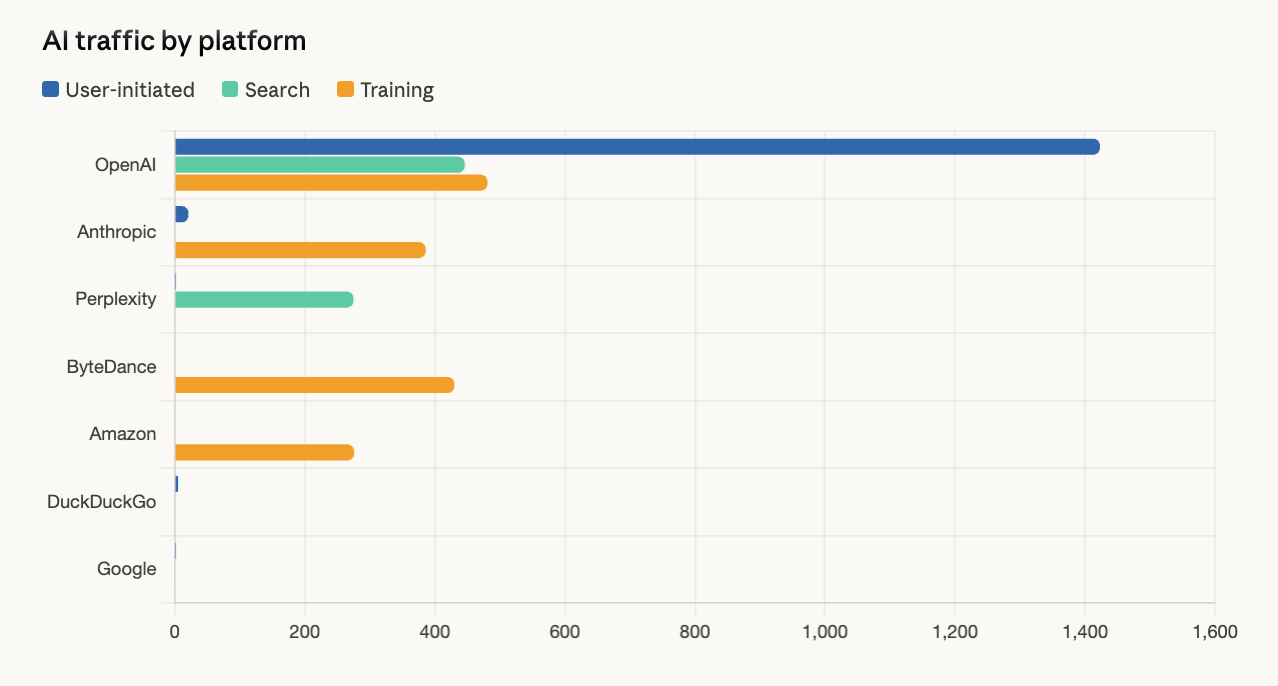
Content Insights: Which pages AI assistants reference most, which platforms cite your content, and where to create more content to capture AI-driven leads.
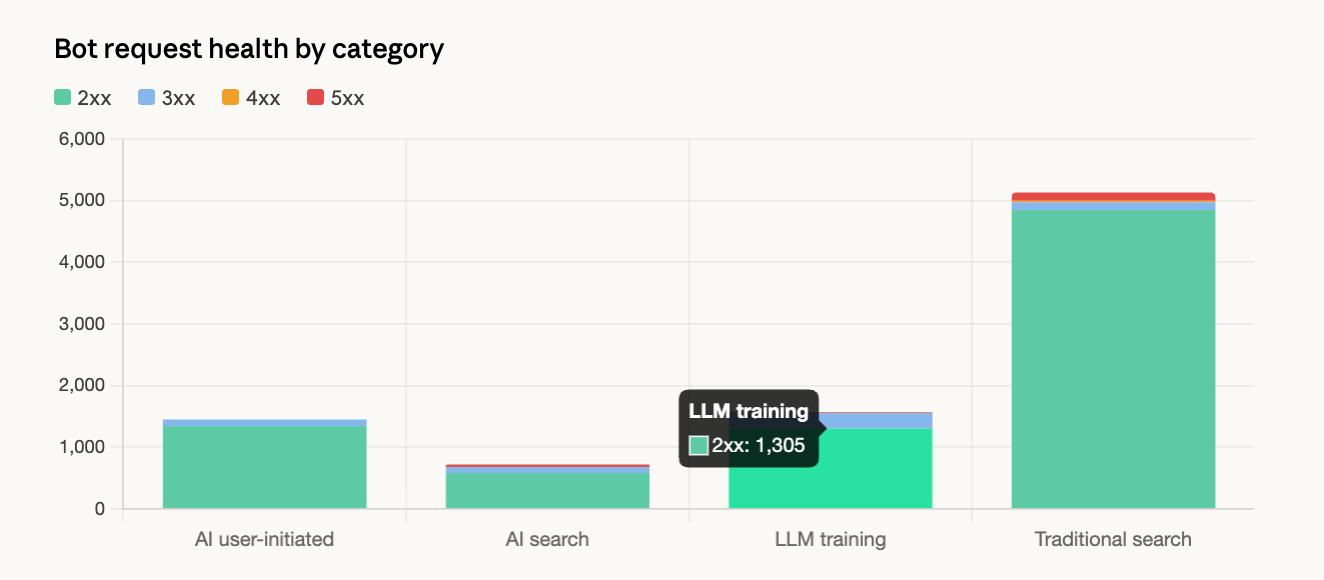
Technical Analysis: Pages blocked from AI crawlers, error rates, slow responses, and crawl coverage gaps that prevent your content from appearing in AI answers.
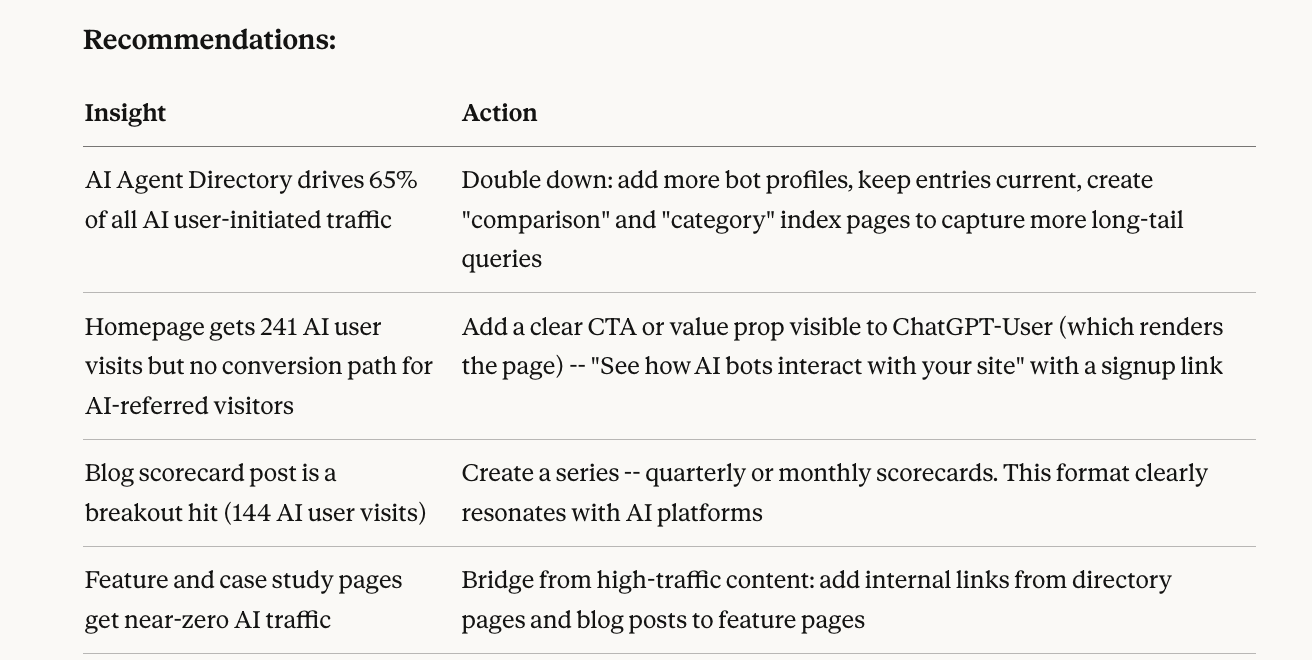
Actionable Recommendations: Every finding is paired with a specific action tied to growing your pipeline - more top-of-funnel traffic, better conversion from AI referrals, and new customer acquisition from AI discovery channels.
What we found running it on our own site
I ran the skill on Siteline's website and one finding stood out: ChatGPT agents were hitting our AI agent directory pages significantly more than our blog content. That's an important demand signal we weren't tracking before, and it directly informed where we're focusing our next round of content.
As someone who's worked in product analytics for years, seeing this depth of analysis completed in under 5 minutes is pretty mind-blowing. Also a bit terrifying.
What actions can you take from this data?
The report pairs every finding with a specific recommendation. A few examples:
- High bot traffic on a topic — Create more content in that area, ensure it's structured for LLM consumption
- High bot traffic but low human referrals — Content is being referenced by AI but users aren't clicking through. Restructure to be more action-oriented
- Pages returning 403/429 to bots — You may be unintentionally blocking AI crawlers via Cloudflare or robots.txt rules
- Differential access — Pages accessible to humans but blocked for bots, meaning AI platforms can't learn about that content
How to get started
You need two things: server logs (to see bot traffic) and optionally an analytics connection (to see AI-referred human traffic).
- Grab the SKILL.md from GitHub
- Add it to Claude
- Say "Analyze my AI bot traffic"
The skill handles the rest: connecting to your data sources, classifying bots, aggregating metrics, and generating the report.
Please give us a star on the repo if you like what you see :)
Overall we're very excited that bite-sized skills and portable domain expertise sharing are finally here. It's a massive unlock for making specialized analysis accessible to anyone.
If you want continuous monitoring rather than a point-in-time snapshot - with verified bot identification for 200+ bots, automated topic clustering, and trend detection - check out Siteline.