
How well do AI agents understand top software products? An in depth benchmark analysis

Summary
Most AEO / GEO analysis has focused on the discovery of new products through AI platforms. But the rise of AI agents requires a focus further down the funnel: even after a customer knows about a product, they're turning to agents to ask in-depth follow-ups on feature sets and pricing.
All with highly varying success. Many websites might look great for human visitors, but are inaccessible to agents or don't provide adequate product info (or provide way too much). To understand how prepared today's top software is, we ran repeated simulations with a Claude agent across 100 top B2B products and took in-depth measurements of success rates, costs & efficiency.
In short, for each product we asked our agent to:
“Find the monthly pricing for all publicly listed plans offered by [Product Name] and list the top features of each plan.”
Here are a few of the top findings:
- Large cost & efficiency variance between websites. The median agent run took 32 seconds, made 3 searches and fetches and cost $0.24 using Claude Sonnet 4.6. But with a huge spread between products: the top 10% of products ran 2x faster at less than 1/4th the cost of the bottom 10%.
- Easy access and concise information was the winning combination. Sites that gave the agent what it needed on the first try made extraction fast and efficient. On poorer-performing sites, the agent had to sift through large amounts of scattered text and ran into technical access issues.
- Access barriers lead agents to reference untrustworthy 3rd party info. Nearly 1 in 3 runs had at least one error searching or fetching the site. 25% of those were the agent being denied access entirely. Runs with access errors pulled 58% of content from 3rd party sources vs. just 12% for runs where the agent accessed the website smoothly.
- Only 65% of plans surfaced pricing directly. The rest got pushed to a demo or managed sales process, leaving room for the agent to recommend a competitor that does publish its prices.
Background: How do AI agents research product info?
In the past 6 months products like ChatGPT and Claude are becoming increasingly “agentic.” Whereas in 2025, in response to a user prompt they might have referenced the pre-trained LLM and maybe conducted a search or two, today for queries seeking up-to-date product info they will most certainly conduct multiple fan-out searches, page fetches and perhaps other internal tool calls to process what they've found (last Fall's GPT-5 release was a step change up in the likelihood to search).
This change in behavior means that websites need to be accessible and digestible by agents as they visit multiple pages and conduct their research - much like human sessions of the past. But many websites are still built for human audiences meant to keep out agents (via firewalls, access controls etc) or built without agent access in mind e.g. require Javascript or client-side rendering, which most AI agents are not capable of.
As we put our Claude agent through its paces, clear examples emerged of “successful” and “high friction” sessions as it sought product pricing and feature info.
Success was measured by a few key factors:
- Accessibility. Could the agent identify and access the company website without issue?
- Key information pulled cleanly. Was product and pricing info easily discoverable, agent-readable and structured correctly for extraction?
- Token usage, cost and time spent. How expensive and time consuming was it to find the key info? With increasingly complex agents, cost per resolution is rising and businesses are becoming more price sensitive.
Success example: Linear
Linear.app (modern engineering project management) was a consistent example of easy agent access and clear information resulting in a fast and cost-efficient agent session. The agent found what it needed in under 20 seconds for $0.10 without consulting external sources other than Linear's own website:
Quick and straightforward session with one search to locate the pricing page, one fetch to read it. The model parsed 4 plans with pricing and top features in a single pass. No errors or third-party fallbacks.
High friction Example: Zendesk
Zendesk (a leading customer support platform) was a good counter example where the agent struggled. Admittedly, it's an older product with a more complex offering (we controlled for this later in the analysis), but multiple Javascript elements meant the agent couldn't read the page and turned to costly and untrustworthy 3rd party sources.
The result was a 5x longer and more expensive session that potentially poorly represented Zendesk's offerings as it didn't come from their own website.
Zendesk's pricing page loaded but plan details are JS-rendered and not visible to the agent. After two failed attempts at first-party data, it fell back entirely to third-party blogs, which risk being outdated or inaccurate.
Speed & Cost: Varying results across websites
While the median session ran for ~32 seconds at a reasonable cost of $0.24, there was a 2.2x difference in time taken and 4.2x price difference between the top 10% most efficient runs and bottom 10%. The bigger spread on price was due to costly additional web search tool calls.
I'd note that our simulations were done using Anthropic's mid-tier Sonnet 4.6, but with the latest Opus 4.8 the top 10% of runs would cost close to $1 each! Something to consider as users are becoming more sensitive to token costs as pricing increases.
| Time (s) | Total Tokens | Web Searches | Web Fetches | Total Cost | |
|---|---|---|---|---|---|
| p10 | 22.9 | 42,212 | 1.0 | 1.0 | $0.142 |
| p25 | 26.4 | 46,357 | 1.0 | 1.0 | $0.156 |
| Median | 31.7 | 73,230 | 1.0 | 2.0 | $0.236 |
| Mean | 35.0 | 97,388 | 1.5 | 2.3 | $0.311 |
| p75 | 40.8 | 123,045 | 2.0 | 3.0 | $0.391 |
| p90 | 50.4 | 188,977 | 2.0 | 4.0 | $0.589 |
Naturally there's a big difference between the product offerings and pricing of a product like Stripe vs. a newer entrant like Linear. But even when we control for the number of product offerings there's still a wide spread between the best and worst performing websites for cost (we only see a 3% drop in variance).
Access errors and reliance on 3rd party sources
While agents from Claude and ChatGPT are designed to be resilient and make multiple attempts to find information, the error rate in the runs was surprisingly high: 30% of runs had at least 1 error. 25% of the errors were due to 'URL not accessible' or 'URL not allowed', meaning the agent faced bot blocking, broken or non-HTML pages.
In the majority of cases the agent recovered from errors, retried, and was able to access the info on the website. But in 5% of runs it completely abandoned the brand's website and fetched 100% of information from 3rd party sources - which presents the risk of being inaccurate or stale.
Overall, runs with access errors pulled 58% of content from 3rd party sources vs. just 12% for runs where the agent had no issues accessing the companies' website.
Another key factor in agents abandoning websites and turning to 3rd party sources is the prevalence of client-side rendered sites that require Javascript. With the exception of Google, crawlers / agents from top AI platforms e.g. Anthropic and OpenAI do not run Javascript, all HTML must be fetched from the server.
While not technically counted as errors in our dataset, 13% of runs had references in the agent's internal processing mentions of Javascript or rendering issues.
The grand reveal: top and worst performers
Let's get to it. Our agent evaluated 20 in each of 5 prominent B2B SaaS product categories: Productivity/Collaboration, Developer Tools, Marketing/Sales, Customer Support and Analytics/ Data.
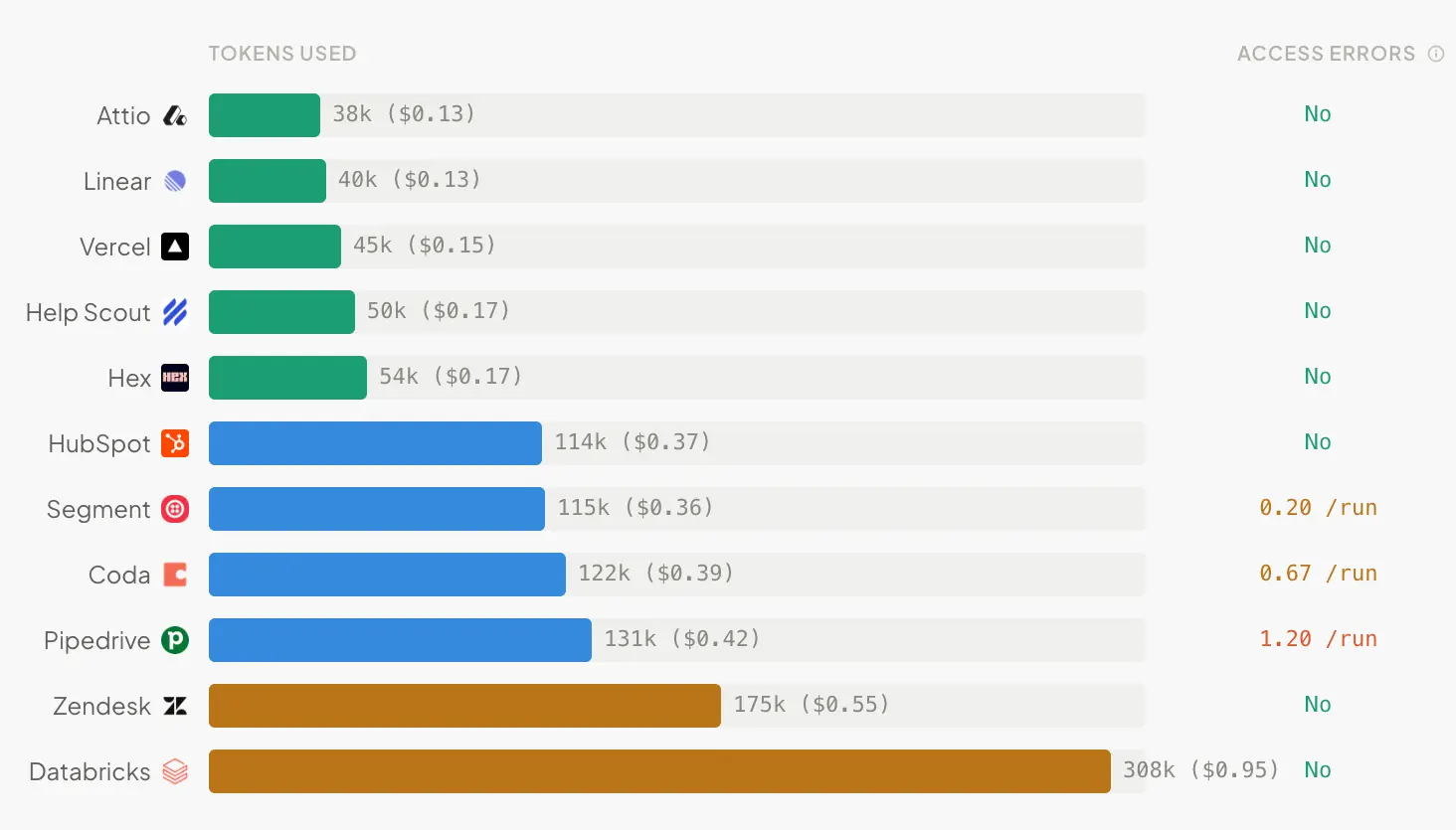
In favor of interpretability I'll show the cost of an average run (Sonnet 4.6), the % of content pulled from 3rd party sources and % of runs with access errors - but you could imagine a more robust “agent access score” like we've developed for Siteline. We'll use cost instead of just tokens as it includes tokens + search / fetch tool calls, which tend to be quite expensive. You can find additional metrics by hovering over the bars.
Again, let's caveat that some products are naturally more complex, have bigger offerings and will take more effort for an agent to process. But that doesn't necessarily let them off the hook, it's still more expensive for an agent to understand.
View the full results dashboard
Marketing & Sales
Observations:
- Braze - The agent was unable to access pricing pages across all runs. It falls back to a Braze resources article that discusses pricing, but still ends up pulling pricing from G2 + Vendr.
- Iterable - While there were no direct access issues, the agent did face
url_not_in_prior_contexterrors, which come from the URL it tried to visit (iterable.com/pricing/) not being in the search results (the agent hallucinated it - it doesn’t exist). After that, the agent falls back to 3rd party sources. The lesson here might be to always have a pricing page even if you don’t disclose prices directly.
Productivity & Collaboration
Observations:
- Coda - The agent’s attempts to fetch the pricing page all fail — the page is either blocked or inaccessible. It turns to 3rd party sources to piece together plan details.
Developer Tools
Observations:
- Overall nicely performing category with no access errors and quick run times. Supabase, much like our Linear example, has one static SSR pricing page that in 24KB returns complete pricing and features for all plans.
- Despite successful runs, Twilio and Stripe were relatively slow and expensive. Yes, they’re both sophisticated platforms with multiple product lines, but the agent had to navigate 3–6 different pricing pages for Twilio and up to 6 for Stripe. It could be worth it to have a single source-of-truth machine-readable page in markdown.
Customer Support
Observations:
- Gladly - Repeated failures trying to fetch non-existent pricing pages. Agent falls back to pages from Shopify App Store and large 3rd party articles.
- Zoho Desk - Accessible but thin pricing pages. In some runs the agent supplements with third-party sources like Capterra.
- Zendesk - We discussed it in our examples earlier, but interesting to note that there are no access errors and the page partially renders server-side (titles, some prices, FAQs). But the pricing plan grid with features loads dynamically, which is forcing the agent to go elsewhere to seek more information.
Analytics & Data
Observations:
- FullStory - Their pricing page has no prices at all despite showing different plans (more on price disclosure below).
- Databricks - Most expensive product for agent access across the analysis, despite having accessible pricing pages. The agent identifies multiple first-party pages, but the pay-as-you-go rates are behind an inaccessible cost calculator, so the agent ends up turning to 3rd party sources.
- Omni - $0.8 on 260K tokens on average despite mostly sticking to 1st party content seems odd… Looking deeper, because Omni is such a generic name (and not yet a well-known product), the agent sifted through many different search results with encoded page content before finding the correct product. A bit of a tough break, but interesting to see outside factors hit model costs.
A note on price disclosure
Putting up a pricing page that has “Contact Sales” rather than actual prices has been a common B2B practice for years for products looking to avoid sticker-shock and funnel leads into a traditional demo-led process. While further analysis would be needed to definitively link price disclosure to visibility in AI answers, it's no stretch to think that for customers diving deep on price comparisons or value of a potential service it's important for agents to have access to this information.
In our runs, 65% of plans found disclosed price while 14% of products did not disclose prices in any plans at all i.e. everything required contacting sales. Naturally this varied by product category with the agent unable to find any prices at all for 30% of Marketing / Sales and Customer Support products.
| Category | Price disclosure | No prices found |
|---|---|---|
| Productivity & Collaboration | 78% | 0% |
| Developer Tools | 75% | 0% |
| Customer Support | 61% | 30% |
| Marketing & Sales | 56% | 29% |
| Analytics & Data | 54% | 12% |
What businesses can do to ensure agent readiness
Lot's of discussion of problems, but let's now talk about what can be done.
Ensure accessibility
Browser-use agents that run Javascript are coming, but they are expensive and slow so will not likely become the norm. At the moment by far the biggest impediment to agents retrieving content is their inability to read client-side rendered elements. Ensure all sections that contain text on your website are rendered server-side if you want it to be discovered.
You can easily test this to understand what agents will see in Chrome web tools by going to Inspect > Settings > Preferences > Disable JavaScript. It's also worth checking access basics: your robots.txt and bot blocking settings. Default block settings in Cloudflare bot control are a common culprit, so check those make sure you aren't turning away the agents you actually want reading your pages.
Make your content easy for agents
Write concise but information rich answers with no fluffy language, and give rich descriptions of your feature sets and pricing. It's important to also front-load the key information. Agents reliably only fetch the first 15-20K tokens on a page, so the earlier an agent can find what it's looking for the quicker it can reach an answer with fewer tokens processed, which reduces cost.
It's also worth exploring some of the emerging standards for agent accessibility:
- Cloudflare's automatic conversion to markdown strips out the noise agents don't need.
- Chrome has introduced a WebMCP which gives agents ‘on the fly’ access to tools to use on your site much like pre-installed standard MCP.
- Even the llms.txt standard, which was considered laughable by SEOs not long ago, is now referenced by agents and bots more frequently according to data from Siteline and Chrome just added it to their Lighthouse developer best practices.
Ensure accuracy of 3rd party sources in case of fallbacks
Ideally an agent can find what it needs on your owned and operated properties, but it's inevitable that 3rd party sources will be referenced - particularly for discovery prompts higher up the funnel. You should monitor the top sources citing your brand / product in an AI visibility tracking tool and make sure that the information mentioned there is up to date and accurate.