
Spring Feature Release: Mentions Building, Teams & Roles, and More


A lot has happened since we launched Siteline (formerly GPTrends) last month. If you missed the announcement: we change our name and shipped AI Agent Analytics, an extra data layer that tracks how AI bots and agents interact with your site.
The response has been great, including a #1 Product of the Day on Product Hunt and a feature on Jason Calacanis' This Week in Startups.
But shipping Agent Analytics was just the start. We've been heads down building on top of it, and today I want to walk through three updates that make Siteline more useful for Growth and SEO teams working on AI Search.
Get Placed on the Sites AI Cites Most
If you've been tracking AI visibility, you've probably noticed that certain third-party sites keep showing up as sources in AI answers.
Listicles, comparison guides, product roundups. This isn't a coincidence. An extensive Ahrefs study of 75,000 brands found that brand web mentions are the single strongest factor correlated with AI Overview visibility, outperforming backlinks by 3x.
Getting your product placed on the pages AI already trusts is one of the most effective levers you can pull.
But the outreach process is tedious and hard to prioritize. You have to identify the right publishers, figure out who to contact, negotiate placement, and track it all manually. If you've ever done backlink outreach, you know how much time this takes.
We built a tool to handle this inside Siteline. Here's how it works.
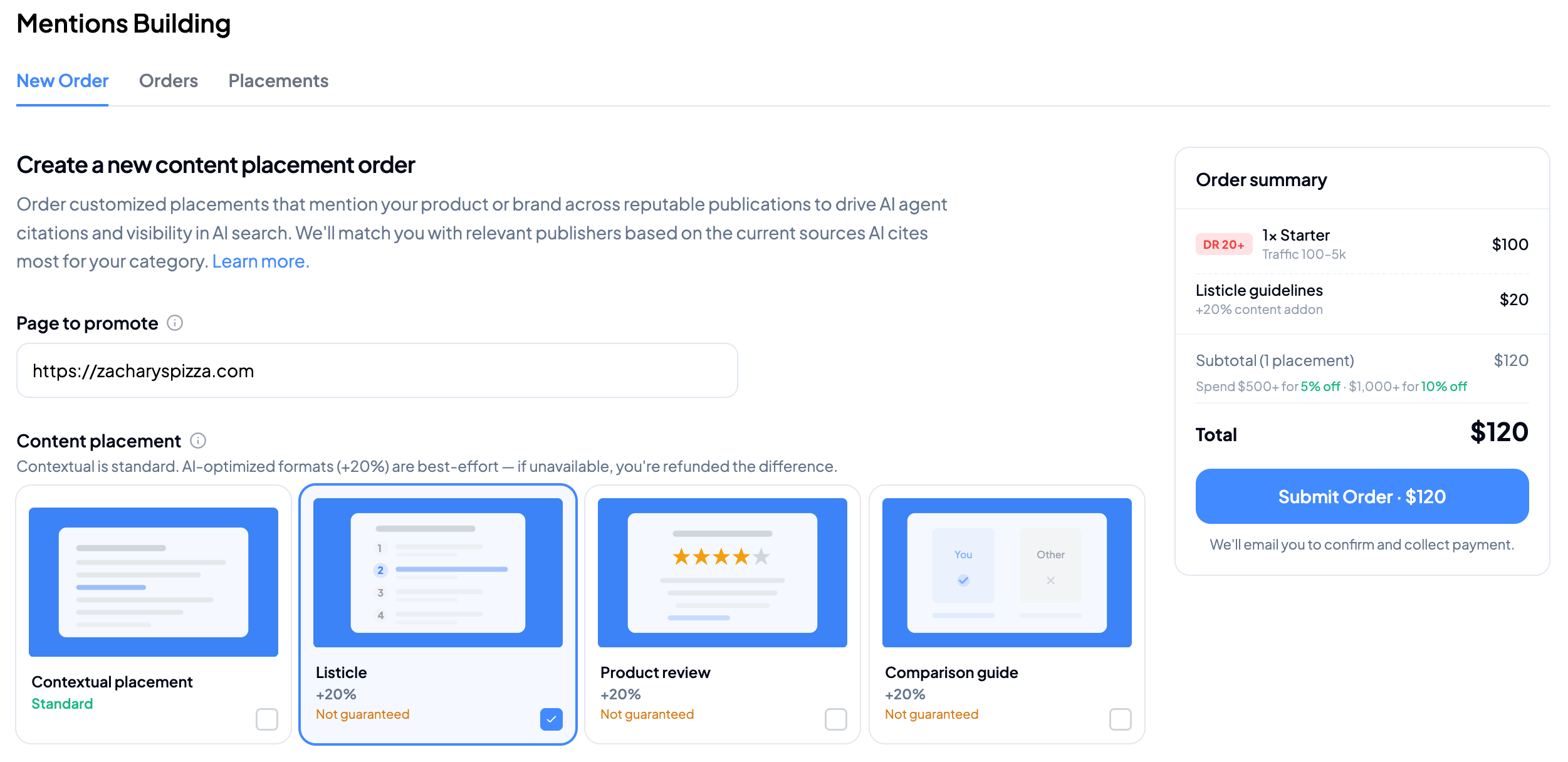
How it works
1. Set the page you want to promote
Enter the exact URL you want publishers to link to. This is the page that will receive the contextual backlink from the publisher's article, so pick the page that best represents your product for the category you're targeting.
2. Choose your content type
There are four placement formats to choose from:
- Contextual placement (standard): Your product gets a native mention within a relevant article. This is the default and most common format.
- Listicle: Inclusion in a ranked or curated list (e.g., "Top 10 analytics tools for 2026"). Adds 20% to the placement price and is not guaranteed, as it depends on editorial fit.
- Product review: A dedicated or semi-dedicated review of your product. Same +20% premium, same editorial dependency.
- Comparison guide: A side-by-side comparison that includes your product. Also +20%, also subject to publisher availability.
Contextual placements are the most reliable option. The curated formats (listicle, review, comparison) carry a premium because they require more editorial work from the publisher and aren't always available for every category. If we can't deliver a curated format, you're not charged for it.
3. Select a publisher package or build your own mix
We tier publishers by Ahrefs Domain Rating (DR) and monthly organic traffic, so you can match authority level to your goals and budget:
| Tier | Domain Rating | Traffic | Price |
|---|---|---|---|
| Starter | DR 20+ | 100 - 5k | $100/placement |
| Standard | DR 30+ | 100 - 10k | $160/placement |
| Authority | DR 40+ | 500 - 20k | $240/placement |
| Power | DR 50+ | 1k - 30k | $400/placement |
| Elite | DR 60+ | 1k - 100k | $500/placement |
If you don't want to think about the mix, there are three pre-built packages:
- Kickstart (2 placements: 1x Starter + 1x Standard) at $260
- Growth (3 placements: 1x Starter + 1x Standard + 1x Authority) at $475, saving 5%
- Pro (4 placements: 1x Standard + 1x Authority + 1x Power + 1x Elite) at $1,170, saving 10%
Or customize your own mix by adding individual placements from any tier.
4. Control how domains are approved
You have two options for publisher domain approval:
- Auto-approval: We place on any qualified site that matches your tier criteria. No action needed on your end. This is the default.
- Pre-approval (+20%): You specify what type of domain you prefer. We'll propose domains and you get 7 days to accept or reject each one. If you decline, we offer two alternatives. After a third rejection, we credit the placement back to your wallet. This option gives you full control but adds 20% to the price.
5. Set your delivery timeline
- Standard (28 days): Placement goes live within 28 days. No extra cost.
- Express (14 days): Placement goes live within 14 days. Adds 20% to the placement price.
Why we built this
Most AI visibility tools stop at measurement. They'll tell you which competitors are being cited and on what pages, but then you're on your own to figure out what to do about it. The gap between "I know competitor X is cited on this listicle" and "my product is also on that listicle" is where most optimization efforts stall.
Siteline closes that gap. We match you with publishers based on the sources AI actually cites for your product category, so you're targeting the pages that directly influence AI answers, not just any site with decent traffic.
To monitor progress, you can check Citations in Siteline's Visibility Tracking to see if the publisher article starts showing up as a source in AI answers. You can connect the placement directly to citation impact over time, closing the loop between spend and results.
The feature is available for everyone. You only pay per placement. Approval option available - if none of the domains we surface are a fit, we credit it back to your wallet.
→ Get up to 10% off your first placement package
Teams & Roles
We now support multiple accounts and the ability to invite teammates! With Admin/Member roles you can collaborate without stepping on each other's toes.
Additionally, agencies can now manage multiple client accounts under one roof. When you share access with a client, they only see their own data.
For growth teams
You can now invite teammates under Settings > Team > Members. Enter one or more email addresses, assign a role, and send the invite. If they don't have a Siteline account yet, they'll be prompted to create one.
There are two roles:
- Member: Can view all products, websites, and analytics data. Can't invite or remove users, change roles, or manage linked organizations.
- Admin: Everything a Member can do, plus user management, product and website configuration, and linked teams setup.
The account creator is an Admin by default.
For agencies
If you manage multiple client accounts, you can create linked teams under Settings > Team > Linked Teams. Enter the client's name and the owner's email, and we'll send them a setup link.
Once the linked team is active, your team (as the parent one) can view all products, websites, and analytics data across every linked client account from your own dashboard. The client's team only sees their own data.
This is one level deep by design: a linked team can't create its own linked teams.
→ Learn more about Teams & Roles
Free Agent Analytics: In Case You Missed It
If you're already using Agent Analytics, great. Skip this section. If not, here's the short version.
In February we launched AI Agent Analytics as a free, permanent feature of Siteline. It tracks real traffic from AI bots and agents that visit your site to train their models, build search indexes, or fetch content in real time for user prompts.
This matters because one real bot visit tells you more about what AI platforms care about than a hundred simulated prompts. Instead of guessing which prompts to track, you can see exactly which pages AI is pulling from and where agents are dropping off or hitting technical issues.
To see this approach in action, check out our case study with Cerbos. Their team used Agent Analytics data to improve cross-platform AI visibility from 18% to 45%, eventually securing the #1 ranking for key product category prompts. Agent Analytics is free on every plan and takes about 5 minutes to set up.
→ Get started with Agent Analytics
P.S. Know someone who'd get value from Siteline? Our referral program pays up to $1,000 per lead. Find it in the platform under "Refer and earn".